How to make your CV with Sirfy
- Open the bot and choose your language.
- Press “Create a CV” and choose a template.
- Enter your details step by step.
- On the review screen press “Create my CV”; the bot suggests wording improvements, and nothing is applied without your approval.
- Preview your CV and edit it for free.
- Pay, and your CV arrives as a PDF.
ATS-friendly CV templates
Three plain templates with no colours or photos, because applicant tracking systems read text arranged in one column.
Classic
For people with experience who want a familiar traditional layout; suits most fields. Centred header and thin lines between sections.
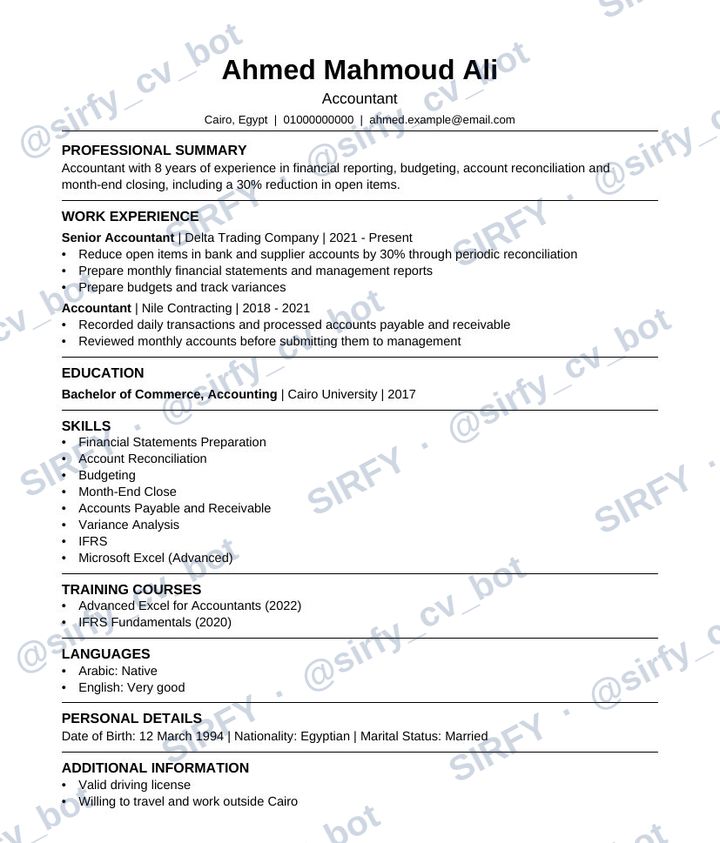
Professional
For those who want core skills at the top, such as jobs that depend on specific skills. Left header and thicker lines.
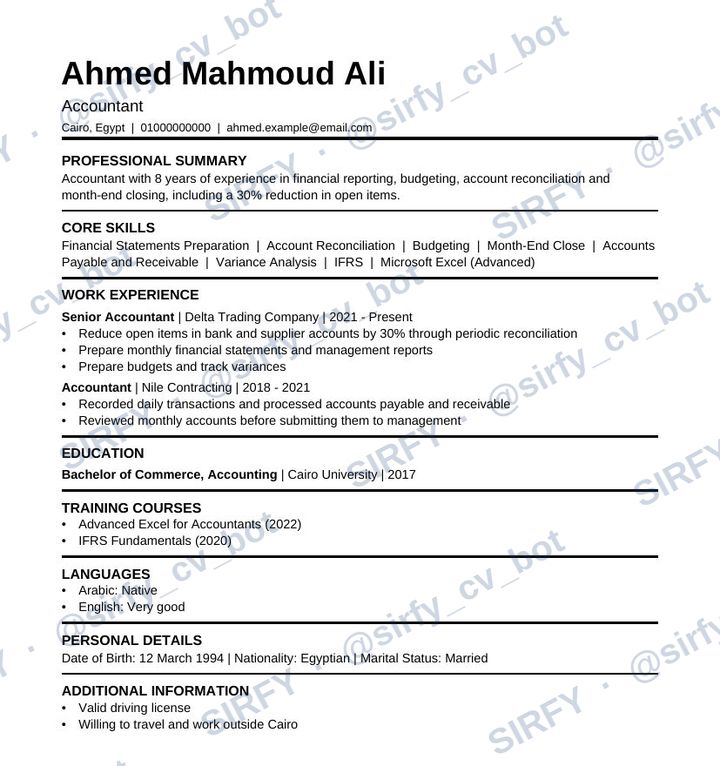
Graduate
For fresh graduates and those with little experience. Puts education, projects and training before experience.
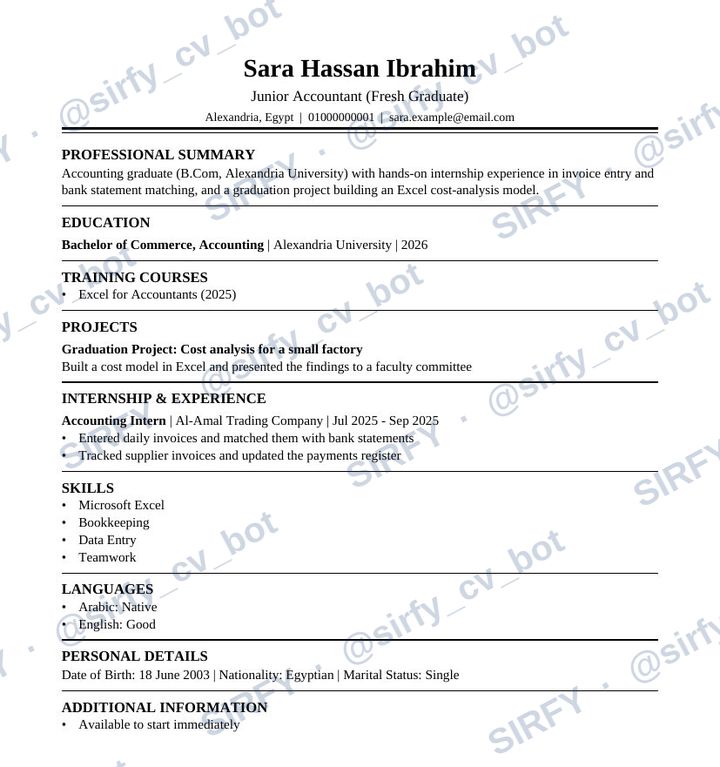
The data in the templates is fictional, for illustration only.
CV prices
- Edits before payment are free, with no limit.
- Payment is currently by Vodafone Cash.
- Prices are in Egyptian pounds and update daily with the dollar rate.
- Edits after download are available within 30 days of delivery and cover everything except the name and phone number.
What are ATS applicant tracking systems, and why do they matter for your CV?
Applicant tracking systems (ATS) are software that companies use to read and sort CVs before a person sees them. If your CV is not read correctly it may be filtered out.
These systems read text arranged in one column and may struggle with tables, columns, photos and icons. That is why Sirfy uses a single column, clear headings and a readable font.
We cannot guarantee that every system will read your CV, and we do not guarantee a job or an interview, but simplicity improves the chance of correct reading. The decision is the company's.
When applying through international company sites we recommend the English version, and you can order both versions together for less than two separate ones.
Frequently asked questions about CVs and ATS
💰 Prices and payment
What is the price?
You find prices in EGP in the welcome message and in «Terms and prices». They change daily with the dollar rate, and the price shown at payment is binding for your order.
How do I pay?
After the preview you continue to payment and see the available methods. Transfer the exact amount shown, with no extra and no shortfall, then send the transfer screenshot, then the information the bot asks for to match the payment.
When do I receive my CV?
After the manager confirms the money arrived. Confirmation is manual and may take some time; the CV reaches you here automatically. Do not transfer twice.
I transferred less than required?
You get a notice with the remainder and a button to send a new screenshot.
My payment was rejected?
You get a notice, and you can send a correct screenshot with the «Send a new screenshot» button.
I transferred too much, or twice?
Make sure to transfer the exact amount, with no extra and no shortfall. We review many orders, and an extra transfer may be hard to verify or trace because of the many messages, or a message may be deleted after the CV is delivered. If it happens, write to us with the order number and the screenshot, but the reply may be late. If the extra amount is below the minimum allowed by the payment methods we cannot return it, but once verified it can be added to your credit for later orders while it remains valid. If we cannot verify the claim we will not be able to return the extra, so accuracy before transferring is the only guarantee.
Can I get a refund?
The CV is a digital product delivered once payment is confirmed, so it is not refundable after delivery. If delivery fails or we made a mistake, we will fix it with you.
I want to cancel the order?
Before payment press «Back». After payment it cannot be cancelled.
Why is the price different from yesterday?
Prices are based on the dollar and updated daily.
Why does the preview of my CV look incomplete?
To protect your work and ours, the preview hides contact details, address and the second name, blurs the lower part of the CV, and carries a watermark. After payment you receive the full, clear CV with all your details as you entered them, with no watermark and nothing hidden. Before paying you can edit any section for free and read everything you wrote on the review screen.
My internet dropped while I was sending the payment proof. What should I do?
Payment confirmation is manual and may take a little while even if your proof reached us, so wait and do not contact us to rush it, so that messages do not pile up and slow everyone down. Contact us only if your internet really dropped while you were sending the proof or the number and you doubt it reached us: send us, through “Help or complaint”, a photo of the payment receipt and the number you transferred from, and we will review and confirm the payment without you paying again.
My payment was confirmed but the CV file has not reached me. What should I do?
The bot automatically retries sending the file within minutes. You can also find your delivered CVs under “My previous CVs” to resend the file. If it has not reached you a reasonable time after the payment confirmation message arrived, contact us through “Help or complaint” and we will send it to you.
✏️ Editing and drafts
Can I edit before paying?
Yes, for free and without limit. From the preview you can go back to any step and change it.
And after payment and download?
From «My CVs», as long as 30 days have not passed since the CV was delivered to you, at the edit fee listed in «Terms and prices». It covers everything except your name, gender and phone number.
Why can't the name, gender and phone number be edited?
Editing is meant to improve the same CV, not to make a new one. If you made a mistake in them, create a new CV.
I stopped halfway, do I lose what I wrote?
No, your draft is kept for 7 days from the last change. Continue from «Create a CV».
What happens after 30 days?
Your CV data is deleted from the bot and cannot be edited. Keep the file.
I lost my CV file?
As long as 30 days have not passed since delivery, open «My CVs», choose the order, then «Resend the file». After 30 days it cannot be recovered, so keep your file in more than one place; you alone are responsible for keeping it after you receive it.
How many jobs and qualifications can I add?
Up to 4 jobs and 3 qualifications, up to 6 points per job, and 2 projects in the graduate template. Pick the newest and most important.
Does the bot write my content or fix my spelling?
The bot arranges and formats what you write. When you press “Create my CV” on the review screen, the bot rewrites your summary, job points and skills, suggests skills the job asks for, and suggests fixes for clear spelling and grammar mistakes. Nothing is applied without your approval, it never adds a skill or number that you did not write or confirm, and it does not change professional terms. It can still make mistakes, so check each suggestion before you approve it, read your full CV text on the review screen (tap “Edit”, then “Back”), and edit what you like before paying.
Can I add a photo or change colours and fonts?
No, because tracking systems may struggle with them.
Is there a limit on the “Create my CV” button?
Yes: 3 attempts per account per 24 hours, which is enough for normal use. An account that has not bought within the last 30 days has 15 attempts per 30 days, and this limit is lifted as soon as you buy. If you reach a limit, you are shown a preview with your own text.
When is the button paused on my account?
We warn you the first time you use up the daily limit. If you use it up again within a week, or on 3 days within 30 days, the button is paused on your account for 3 days, and if it happens again afterwards it is turned off permanently. Only the button is paused; the rest of the services work as usual: you can complete your order, pay and edit.
The button was paused on my account. How is the pause lifted?
For a customer who bought a full CV within the last 30 days, or two CVs within 90 days, or three CVs within 180 days, or a CV and two edits within 180 days: we lift it free of charge after verifying your purchase record. Type /id to get your account number, then send it to us through “Help or complaint”. For others: it is lifted for a fee of 45 EGP, which changes with the dollar rate like our other prices, and it covers the cost of the model usage that was consumed. This is the only fee: it is paid manually to the same payment numbers outside the orders system, it is not refundable once the pause is lifted, and there are no other fees. Lifting a pause does not prevent it from returning if the limit is used up again.
📄 Templates and ATS
What are applicant tracking systems (ATS)?
Software companies use to read and sort CVs before a person sees them. If your CV is not read correctly it may be filtered out.
Why are the templates plain, without colours and photos?
These systems read text arranged in one column and may struggle with tables, columns, photos and icons. We cannot guarantee every system will read your CV, but simplicity improves the chance of correct reading.
What is the difference between templates?
Classic: centred header and thin lines between sections. Professional: left header and thicker lines, with a core skills section after the summary. Graduate: for fresh graduates, putting education, projects and training before experience.
Which suits you?
• Graduate: for fresh graduates and those with little experience.
• Classic: for people with experience who want a familiar traditional layout; suits most fields.
• Professional: for those who want core skills at the top, such as jobs that depend on specific skills.
If unsure, Classic is a good choice for most cases.
Which language should I choose?
Arabic for local companies, English for international ones. Systems read Arabic with varying ability, so we recommend the English version when applying through international company sites. Both versions together cost less than two separate ones.
In what format do I receive the CV?
A print-ready PDF without the watermark. The watermark appears only in the preview.
Do you guarantee a job or interview?
No. A CV is a tool that improves your presentation; the decision belongs to the company.
🔒 Privacy and data
What does the bot store about me, and why?
Only your CV data, to prepare it and let you edit it. Drafts are deleted 7 days after the last change, and delivered CV data 30 days after delivery (deletion is automatic and may occasionally be slightly delayed), so keep a copy of your file.
Do you sell or share my data?
No, we never sell it or share it with anyone. The only exception is that we send your CV text to an AI model from Google when you press “Create my CV”, to improve its wording, as explained in the next question.
What happens when I press the “Create my CV” button?
When you press it, your CV text (summary, experience and company names, skills, education and university names, courses, projects, languages, address, nationality, marital status and similar), plus any job posting and extra numbers you paste, is sent to an AI model from Google to be proofread and to suggest better wording. Your name, phone number, email and date of birth are not sent. Google may keep what it receives and processes it under its own terms. By pressing the button you agree to this.
Does the bot change my text without telling me?
No. Every suggestion is shown to you first and is applied only with your approval.
What if the “Create my CV” button does not work?
If the service is temporarily unavailable, or you have used your daily limit of “Create my CV”, you are shown a preview of your CV with your own text and a note explaining why, and you continue the remaining steps as usual. Nothing you wrote is lost. If you want the wording improved, try again after an hour if it was a fault, or tomorrow if it was the daily limit. Repeatedly using up the daily limit may pause the button temporarily and then permanently on the account, while the rest of the services keep working.
Who can see my data?
The bot manager may see your name, phone number and transfer screenshot only to match the payment.
Why does the bot ask for my phone and email?
Because they appear in your CV so employers can contact you.
Why does the bot ask for information at payment?
We ask only for the information necessary to confirm the payment and make things easier for you and us; it differs by the payment methods available.
What about Telegram itself?
Your chat with the bot passes through Telegram, a party independent from us. We do not sell your data, but we do not control Telegram's privacy policy nor take responsibility for it, so we advise you to read Telegram's privacy policy and terms of service.
📖 By using the bot you agree to this privacy policy and to the “Terms and prices” page.
🎁 Invitations and credit
How do invitations work?
From «Invite a friend, earn» you get your link and share it. Your new friend gets a discount on the first order, and you get points for each friend whose first order is paid and confirmed. Numbers are in «Terms and prices».
My friend bought but I got no points?
Points are added only after your friend's first order payment is confirmed, and only if they entered the bot from your link as a new account that never ordered before.
How do I use my points?
On the payment screen press «Use my credit». Credit covers up to 50% of the order price, and the rest stays for other orders.
How long are points valid?
60 days for each reward separately, from the day it was added.
Can I withdraw points as cash?
No, they are a discount on your own purchases only.
Why does the EGP value of my points change?
Their value is based on today's dollar rate, which is updated daily.
Can I invite myself?
No, invitations count for new accounts only.
What is extra-amount credit?
If you transferred more than required and we verified it, we may add the extra as credit. It is separate from invitation credit, covering the full order price, not only 50% like invitation credit, and valid for 90 days.